
Weekend Festival – Networking & Event App
Overview
The Weekend Festival is a three-day event designed for visionaries and forward-thinking individuals, bringing together innovators from the tech, digital, and creative industries. The mobile app was envisioned as the festival’s primary tool for attendees to navigate the venue, manage their schedules, and network meaningfully.The design aimed to enhance the attendee experience by addressing logistical challenges, fostering professional connections, and delivering real-time updates.
Challenge
The core challenge was to create a networking feature that enabled attendees to make meaningful connections tailored to their professional goals and interests. Users relied on a basic three-day schedule, a map for navigation, and access to festival information as critical tools. Networking was introduced as an extra feature to enrich the app, giving it additional value by fostering purposeful connections among attendees.
Personas
Personas
Alice - The Visionary Networker, Creative Director at a digital agency

Frustrations: Finds it hard to meet like-minded professionals and build connections without a structured approach
Primary Goals: To find collaborators for upcoming projects and gain inspiration from new ideas
Mark - The Professional Seeker, Product Manager at a tech startup

Frustrations: Feels overwhelmed by large events and often misses opportunities to connect with key people
Primary Goals: To network efficiently and scout potential hires for his team
Sarah - The Event Enthusiast, Marketing Specialist

Frustrations: Struggles to stay on top of the schedule and misses interesting sessions due to poor navigation
Primary Goals: To attend as many sessions as possible and engage with thought leaders
Design Process
Research & Insights
After conducting interviews with previous attendees and organisers, the main user needs identified were:
- A streamlined way to network with relevant people.
- An easy-to-follow schedule with real-time updates and location information.
- Access to useful news and resources such as transportation schedules and local dining options.
Wireframing & Prototyping
Key app screens included:
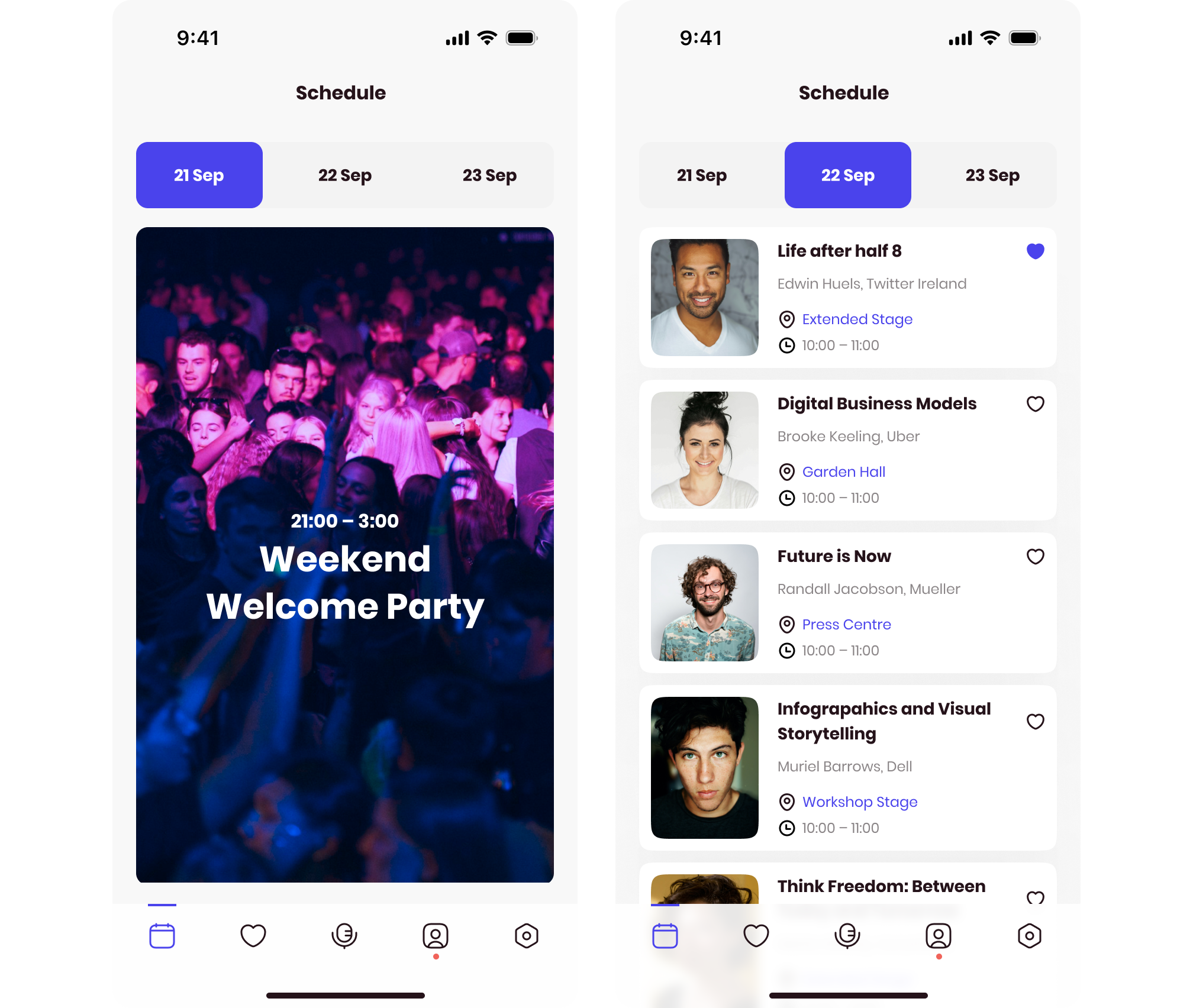
- Schedule: A real-time, interactive schedule with details for each session, including the name of the stage and its location on the map.
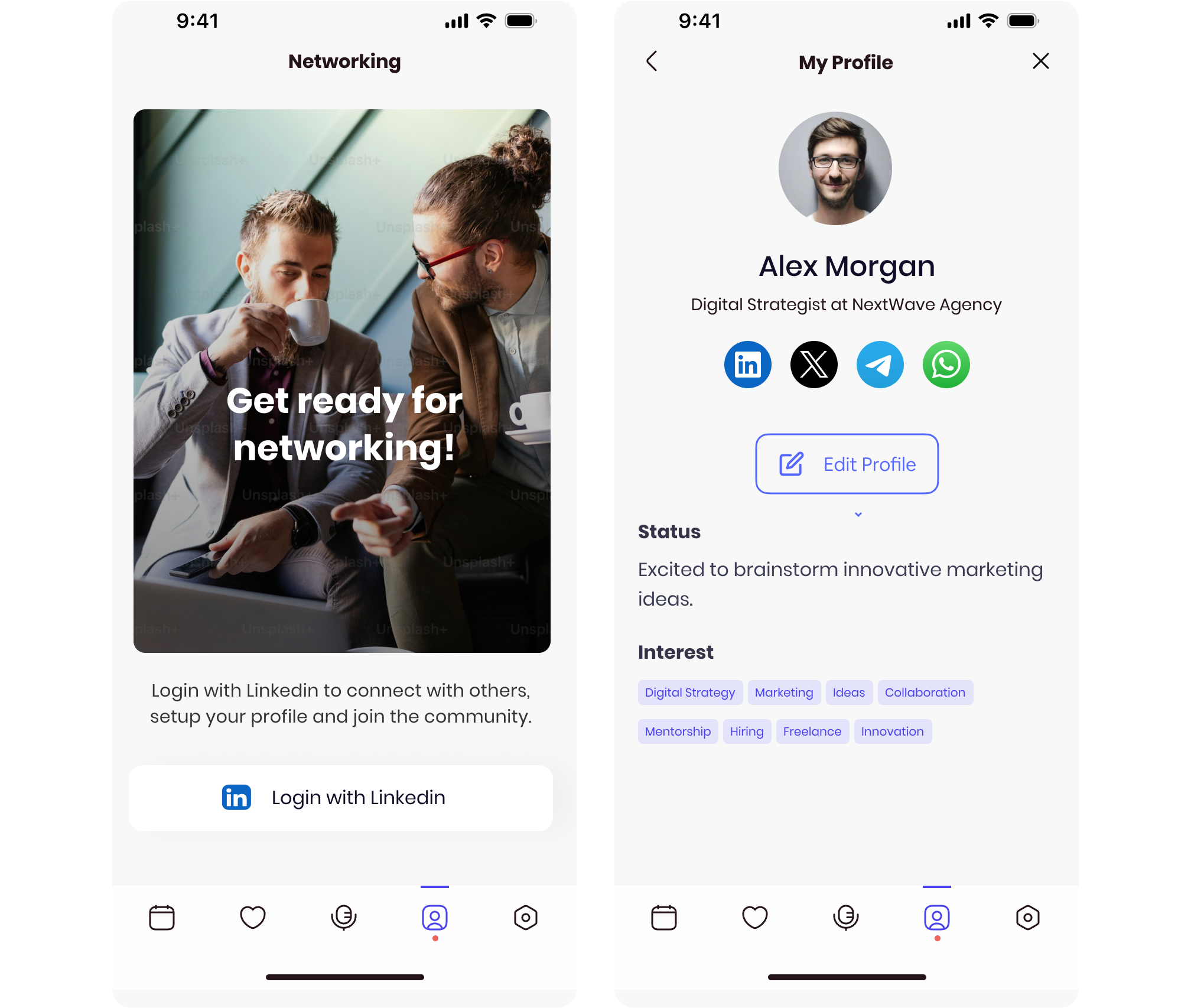
- Networking: The app’s networking feature allows attendees to connect with others based on shared interests. Users set their interests in their profile, and the app suggests matches using clearly defined tags like:
- Looking to Hire
- Seeking Collaborators
- Offering Mentorship
- Looking to Learn
- Exploring Opportunities.
- News: A dynamic feed pulling updates from social media about the festival and highlighting trending sessions or events.
- Useful Info: Practical resources like bus schedules for transportation to the venue and recommendations for nearby restaurants.
This helped inform design decisions around what features were most important for each user type.
User Testing & Feedback
Testing focused on validating the networking feature and schedule navigation. Users appreciated the interest-based matching system, especially the tag categories, which made it clear how to connect with others. Feedback on the schedule prompted the inclusion of push notifications to remind attendees of upcoming sessions and guide them to the correct location.
Solution
The final app design delivered a seamless user experience by combining practical tools with personalization features.
Networking
The networking system allowed users to set their interests in their profile, simplifying the process of finding meaningful connections.
- Interest-Based Matching: Users could select predefined tags such as “Looking to Collaborate” or “Seeking Mentorship,” or simply describe their goals.
- Propose Meetings: Once a match was found, users could propose meetings directly or start chatting to coordinate further.
Schedule & Notifications
The schedule was designed to be highly interactive:
- Session Details: Each session included details about speakers, topics, and the stage name with its location clearly indicated on the map.
- Push Notifications: Users received reminders for upcoming sessions and updates on changes to the schedule.
- Favorites: Users could save their favorite sessions and get notified when they were about to start.
Map Navigation
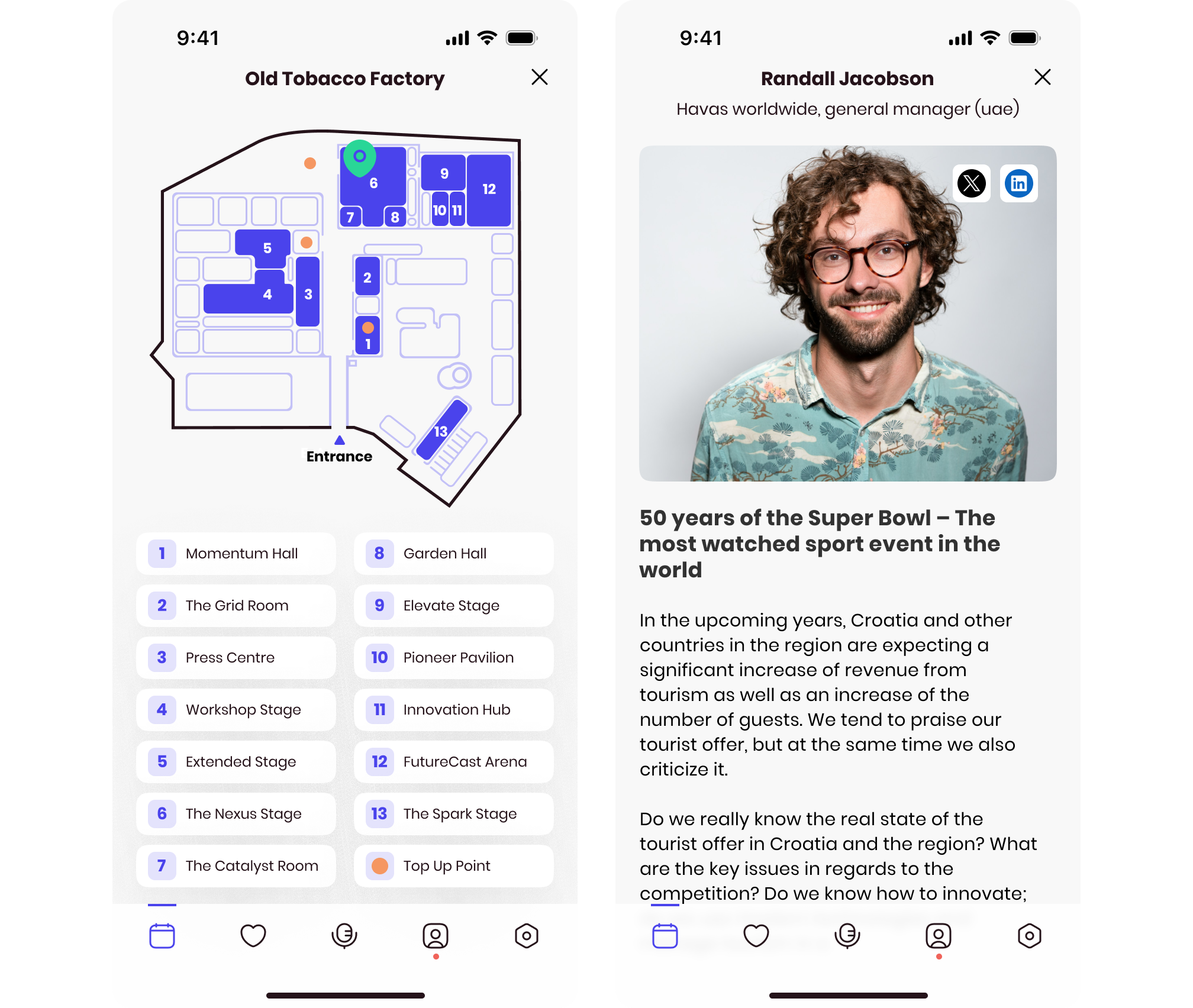
The map provided users with clear routes to each stage, ensuring they could easily navigate the festival without confusion. Stage locations were dynamically highlighted based on the selected session, with unnecessary markers removed to avoid clutter.
News and Useful Info
- News Feed: The app integrated social media updates, showcasing trending sessions, live announcements, and photos from the festival.
- Useful Info Section: Practical information like bus schedules and nearby restaurants made the app a one-stop solution for all attendee needs.
Results & Impact
The app significantly improved the attendee experience by combining powerful networking tools, real-time notifications, and practical resources:
- Enhanced Networking Efficiency: The interest-based matching system helped attendees make 30% more meaningful connections compared to previous years.
- Improved Session Attendance: Push notifications and the integrated map ensured users didn’t miss key events, increasing session attendance by 20%.
- Higher User Satisfaction: 90% of surveyed attendees found the app intuitive and useful, particularly praising the networking and schedule features.
What’s Next?
Future plans include integrating AI-driven features to further personalize the user experience. Potential applications for AI include:
- Connection Suggestions: AI can analyse user profiles, session attendance, and written descriptions to suggest matches intelligently without requiring manual tag selection.
- Session Recommendations: AI could recommend sessions and events tailored to user interests, helping users discover opportunities they might have missed.
- Enhanced Insights: AI-powered analytics could offer users deeper insights into their networking activities and suggest follow-ups post-festival.
These enhancements aim to elevate the app’s functionality, providing smarter tools to attendees while maintaining the intuitive user experience.
Key Takeaways
- User-Centered Design: Conducting in-depth research and testing ensured the app met the diverse needs of attendees.
- Streamlined Functionality: Combining networking, schedule management, and practical resources into one app created a seamless experience for attendees.
- Future Potential: The app is positioned to grow with the inclusion of AI, enabling smarter, more personalised features in subsequent iterations.
The Weekend Festival Mobile App not only facilitated smooth navigation and scheduling but also became a platform for meaningful professional connections, setting a new standard for event management applications.
.svg)
.avif)
.avif)